RDShadow: When Server Manager Doesn't Cut It for Remote Desktop Services
A fast PowerShell tool for admins who are tired of Server Manager.
The Problem
If you manage Microsoft Remote Desktop Services at any real scale, you already know the pain: Server Manager’s RDS management console was built with the assumption that you have exactly one deployment to look after. The moment you have more than one (a corporate deployment and a customer-facing one, internal and externally-published collections, separate environments per business unit, whatever your org’s shape happens to be) that assumption falls apart, and Server Manager doesn’t adapt. You switch deployments by re-pointing the console to to your other deployments entire set of core servers, and waiting for it to re-enumerate the collection and session hosts, and doing it all over again each time you want to manage a different deployment. Let’s not forget that if you somehow miss removing a server from the previous deployment or don’t add one from the deployment you want to connect to, you end up waiting for enumeration to fail.
Multiply that by “a user needs remote support, find out which of the four deployments, which collection, and which session hosts they’re actually on” and you’ve got a fifteen minute investigation that should take five minutes because you now have to switch deployments and wait for everything to load.
The Solution
So with Server Manager’s limitations becoming increasingly cumbersome, years ago in my SysAdmin days I built RDShadow: a remote support tool for Microsoft RDS that does the handful of things I used to do daily. This includes tasks like locating a user, shadowing (remote viewing/controlling) their session, logging them off, sending notifications, checking if they’re locked out, and unlocking the account. RDShadow allows you to do these things across every deployment at once, without the overhead of the limited management console provided by Microsoft.
Features
Search once, find everywhere.
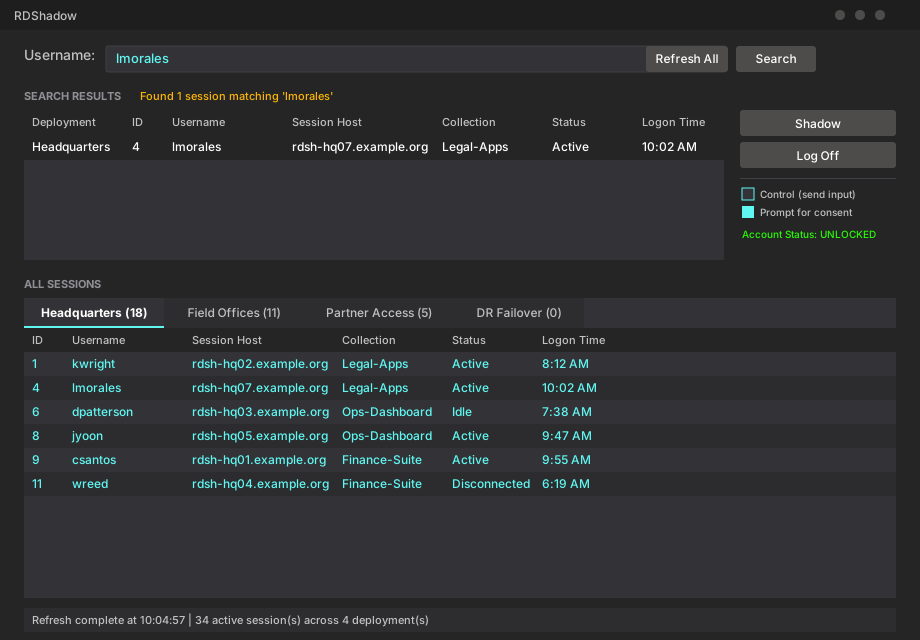
Type a username and hit Enter. RDShadow checks every configured deployment in parallel and shows you every matching session (which server, which collection, whether they’re active or idle) instead of making you guess which deployment to check first.
Shadow or take remote control of sessions (with consent prompt).
Select a session and view it remotely (shadowing). Toggle “Control” if you need to actually drive the session rather than just watch, and toggle “Prompt for consent” depending on whether you want the user to approve the connection first (useful for support scenarios or where security policies mandate it).
Log the user off from a session.
No need to open a separate console or terminal to force a stuck session closed or ensure a user did in fact log off. Select it, confirm, done. RDShadow executes, re-verifies, and refreshes in the background.
Account status at a glance and single-click unlock.
Every search also checks whether the account is locked out, with a one-click unlock if it is. That means “is this a session problem or a password problem” stops being a second investigation.
Send messages or notifications.
Need to pull a server out for scheduled maintenance or troubleshooting and want to notify the user in advance so they can save their work and log off? This feature is for that.
Manage multiple deployments on one screen.
Tabs across the bottom show live session data for every deployment you manage, side by side, refreshing in the background without freezing the UI while it works.
Support Users Across Any Number of Deployments
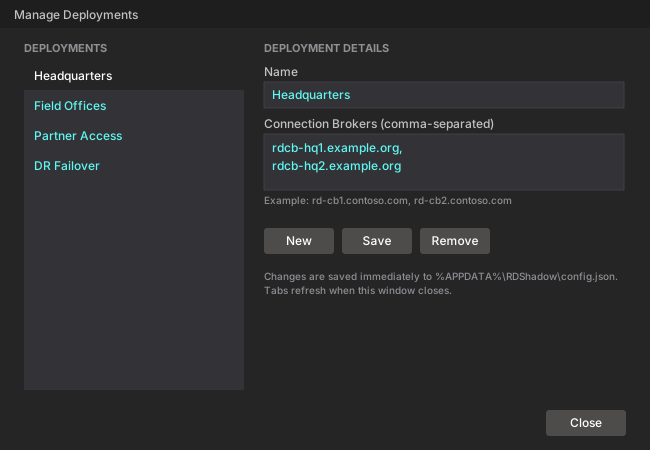
Add as many deployments as you want. Rename or remove them just as easily. Everything is written to a small config file in %APPDATA%, so your deployments are exactly where you left them the next time you open the tool. No redeployment, no code changes, no asking someone else to edit a script for you.
Why This Shape, Specifically
The design choices were deliberate:
- It’s PowerShell, not a compiled app with hidden dependencies. Every action the tool takes is a command you could run yourself —
Get-RDUserSession,Invoke-RDUserLogoff,mstsc /shadow. Nothing about it is a black box. - It queries deployments in parallel, not one after another. Waiting for four sequential connection attempts before you see any data is exactly the kind of friction this tool exists to remove. Session data for every deployment loads at the same time, and tabs fill in as each one finishes.
- It never blocks the UI. Searches, refreshes, and logoffs all happen without freezing the window — because the whole point of a fast admin tool is that it stays fast under load, not just on the happy path with one deployment and five users.
Who This Is For
If your organization runs more than one RDS deployment — or even one deployment with enough collections that Server Manager feels sluggish — this tool exists to give back the minutes you lose every time you have to locate a user, check on their session, or clear a stuck one. It’s not a replacement for Server Manager’s deeper configuration work (creating collections, managing licensing, and so on); it’s the fast, narrow tool you reach for dozens of times a day instead.
Where to Download
I recently decided to publish RDShadow on my GitHub and make it open-source.
Get the tool here: RDShadow
## discussion